
HR and Compliance Automation
Policy Acknowledgement Workflow
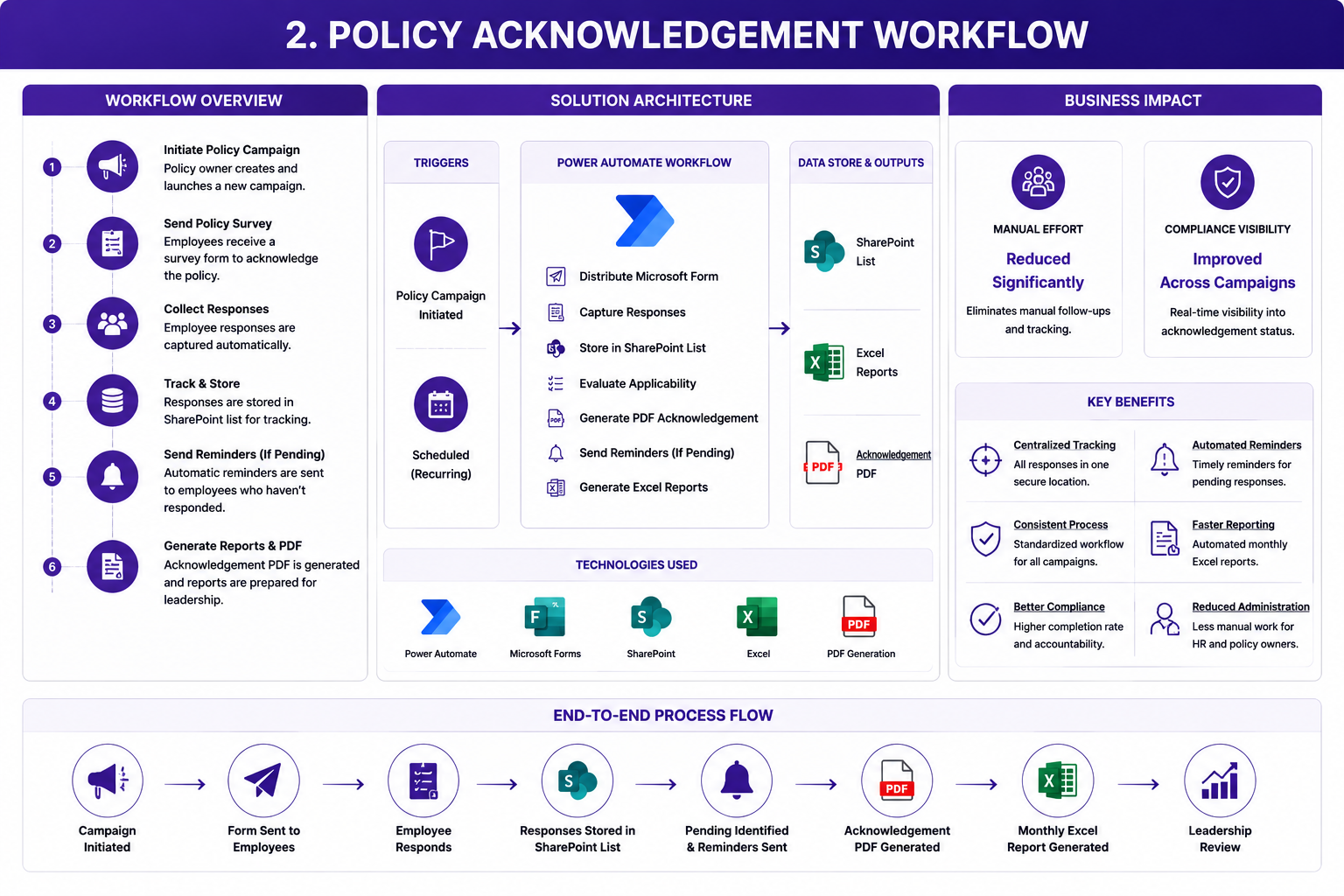
A Microsoft Power Automate workflow that manages policy acknowledgement campaigns, collects employee responses, tracks completion status, sends automated reminders, generates acknowledgement documents, and produces management reports.
The challenge
The policy acknowledgement process required HR and policy teams to manually distribute policy surveys, collect employee responses, identify pending acknowledgements, send reminder emails, generate acknowledgement documents, and prepare recurring reports.
Manual tracking made it difficult to maintain a centralized view of campaign progress. Teams had to spend significant time following up with employees and consolidating information from different sources.
The process also lacked consistent visibility into completed, pending, and non-applicable responses.
The solution
A centralized workflow was developed using Microsoft Power Automate, Microsoft Forms, SharePoint, Excel, and PDF generation.
The workflow:
- Initiates a policy acknowledgement campaign
- Distributes a digital acknowledgement form
- Captures employee responses
- Stores response data in a SharePoint list
- Evaluates policy applicability
- Updates acknowledgement status
- Identifies pending responses
- Sends automated reminder notifications
- Generates acknowledgement PDF documents
- Produces periodic Excel reports
- Provides campaign-level status visibility
SharePoint was used as the centralized tracking repository, while Power Automate controlled the workflow, reminders, document generation, and reporting activities.
The outcome
The solution significantly reduced manual follow-up and reporting effort.
It provided centralized acknowledgement tracking, improved visibility into campaign status, standardized the acknowledgement process, and enabled timely reminders for pending responses.
The automation also improved reporting efficiency and reduced the administrative workload for HR teams, policy owners, and management.